
Starting with Prime Mover 2.2.1+, we added a new feature that lets you export inactive plugins and themes. This works for both FREE and PRO versions of the Prime Mover plugin.
Export Inactive Plugins
- Make sure you update to Prime Mover 2.2.1 or newer.
- Log in to your WordPress site. (Log in as super administrator if multisite).
- Go to Prime Mover -> Toolbox.
- If multisite, enter the blog ID where you want the settings to load.
- Scroll down to the bottom and find the section to export inactive plugins.
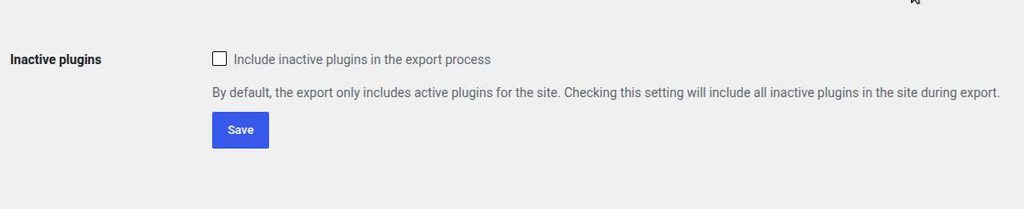
Some important things that you should know:
- This is not enabled by default. So this means that, by default, Prime Mover only exports “activated” plugins.
- If enabled, it includes inactive/installed plugins on the site.
- In multisite, it includes all plugins on the site, even if inactive for that subsite.
- For large sites with so many installed plugins, this will significantly increase your backup and package size, so make sure you have enough disk space remaining for your site if you want to use this feature.
- Please note that when imported to the target site, it will replace all plugins on the target site with the versions in the package. This means that even if the plugin isn’t used on that site but is included in the package to be restored, it will be deleted and overwritten with the plugin from the package.
Export Inactive Themes
- Make sure you update to Prime Mover 2.2.1 or newer.
- Log in to your WordPress site. (Log in as super administrator if multisite).
- Go to Prime Mover -> Toolbox.
- If multisite, enter the blog ID where you want the settings to load.
- Scroll down to the bottom and find the section to export inactive themes.

Some important things that you should know:
- Like inactive plugins – this setting is not enabled by default. This means that when exporting, Prime Mover exports only the currently activated theme on your site.
- Prime Mover exports inactive themes it considers valid. This checks only if it has style.css in the theme root.
- Nested themes are not considered valid; for example, if style.css is not found in the main theme root directory but deeper. For example,/wp-content/themes/YourTheme/your-theme/style.css
- In multisite, it will only export network-enabled themes.
- This export includes all theme types, including parent and child themes.
- For a site with so many installed/inactive themes, this can increase the size of your package so please make sure that you have enough free disk space for the export.
Last updated: September 14, 2026
Was this article helpful?
YesNo