
Problem
You are installing Prime Mover, either the FREE or PRO version, on your WordPress site. When you go to Plugins -> Add Plugin -> Upload plugin, you are not able to install the plugin because of this error:
The uploaded file exceeds the upload_max_filesize directive in php.ini.
Solution
The easiest solution without making changes to your php.ini or server is the following:
- Log in as administrator or super admin if it’s multisite.
- In your WordPress admin, go to Plugins -> Add Plugin. If this is multisite, go to Network admin -> Plugins -> Add Plugin.
- Search the plugin: Upload larger plugins.
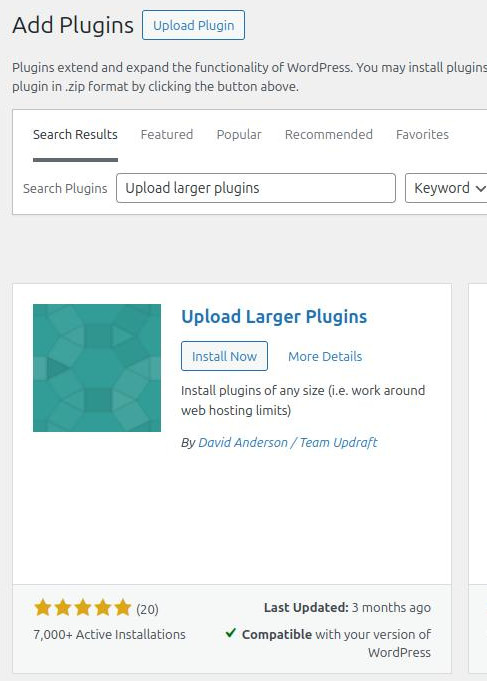
- Click the “Install now” button to install the plugin and then activate it. If you are in a multisite, you need to network activate this plugin.
- Once activated, go back again to Plugins -> Add Plugin -> Upload plugin.
- Install Prime Mover FREE zip or Prime Mover PRO zip again.
- It should work this time, and you should no longer see the error displayed.
- Once installed, activate the Prime Mover plugin.
- Once you have successfully activated the plugin, you no longer need “Upload larger plugins“; then you can safely deactivate it.
Was this article helpful?
YesNo