
When to use this feature?
Since version 2.2.2+, Prime Mover PRO includes its own user privacy feature. This powerful PRO feature helps website administrators, development agencies, and developers protect their own privacy or their clients’ privacy when moving sites to a development environment, and vice versa.
If a package with a user privacy feature enabled is restored to a target site (or development site), you can log in to a sanitized user account by using:
- Log in as a user from the source site.
- A temporary password is available in the source site Prime Mover PRO -> Toolbox -> *** Export-Import Utilities *** -> Sanitize admins.
Prime Mover PRO uses its own reverse-import technology to align sanitized users back to your production site without overwriting your live users’ credentials (emails and passwords) or duplicating sanitized users in the live environment. This means it automatically detects sanitized users from the development environment and imports them back to production, so it seamlessly imports users in the process.
Example usage
- As a business owner, your live website contains real customer emails and passwords. When handing off a site copy to an agency for a redesign, the Prime Mover PRO user privacy feature allows you to mask and sanitize these credentials—including administrator accounts—upon export. Your development agency can then work safely in an isolated staging environment, keeping your users’ original production data protected from casual exposure and accidental outbound notifications.
- As a web developer, you may develop websites in a multisite or single-site environment. When you hand these sites over to a remote client, you can safely sanitize your super-admin or administrator credentials, so your real email and password are never revealed.
- As an e-commerce business owner (or any site that heavily relies on notifications, such as LMS, forums, etc.), you have a website with real client emails, and you want to test your emails in the development environment without sending or spamming your clients’ inboxes. By exporting sanitized users to your development environment, you can safely and securely test your email template and other components.
- To support data privacy best practices and protect customer information in staging environments, you can mask and sanitize user email addresses before transferring sites to a development server. This prevents accidental outbound communications (such as automated notifications or newsletters) from reaching real users and reduces data exposure when granting temporary access to third-party vendors or development agencies.
- If you need technical support from a third-party plugin or theme vendor and they ask for a copy of your site for debugging, you can use this feature. Using Prime Mover PRO’s user privacy feature, you can safely mask or sanitize all of your production site users’ email addresses (including administrators) and passwords. This won’t affect site functionality, since it retains other user information, such as user ID, login, and user meta.
How does email sanitization work?
Prime Mover offers two modes of user email sanitization:
- Safe-Discard Mode (Default): Blocks all emails (e.g clr_am9obi5kb2@err.loc). Outbound emails cannot be sent or received. Use this mode if you want to block email sending and receiving permanently. This prevents your development environment from accidentally sending emails to anyone.
- Developer Mode: Enables email testing via plus-addressing (e.g., dev+s_a1b2c3d4_u1000@gmail.com). You can send and receive outbound emails. Use this mode if you need to test your emails (e.g., email templates) and need to make sure you can still send test emails from your development environment even if these emails are sanitized. This is useful if you are testing your site’s notifications. To activate this mode, define this in your production/live site’s wp-config.php file (Gmail or Outlook recommended).
define( 'PRIME_MOVER_DEV_EMAIL_OVERRIDE', 'yourname@gmail.com' );Note: If using a custom domain email, ensure your mail provider supports plus-addressing (+).
How does password sanitization work?
If you export with user privacy enabled, Prime Mover PRO generates a temporary password for your users. This temporary password is auto-generated and read-only. You do not need to edit or change it. Note that this value depends on your database password and Prime Mover encryption key and will change automatically if either is updated.
Always keep a safe copy of this password for logging in after restoration, or optionally update the account email and set a permanent password in WP Admin. This is never stored in the database or written to a file. This is a hash of your Prime Mover encryption key (which is private and available in wp-config.php) and your database password (which is also private to your site and available in wp-config.php as well). If the database password is empty (such as in XAMPP), then it falls back to AUTH_KEY.
This temporary password is not included in the export package, so it’s safe and only private to you (from the source site). Use this only to log in to development sites restored with the package (which includes sanitized users). It won’t work for a production site, as users need to use their real password.
How to get started? (step-by-step workflow)
Let’s have a common example: say you have a production site and you want to create a staging site. To support data privacy best practices and protect user information in staging environments, you want to sanitize production site users when you move the site to staging. These steps apply to both single-site and multisite configurations.
- This feature only works for a subsite/site with active PRO licenses. Before you proceed, make sure your single site has a Prime Mover PRO license enabled. If you are using multisite, make sure your subsite has a PRO license enabled. You can manage this easily in Prime Mover PRO -> Account and ensure the license is activated.
- Go to Prime Mover PRO -> Toolbox -> *** Export-Import Utilities *** -> Sanitize admins. Check “Mask admin credentials” and save it.
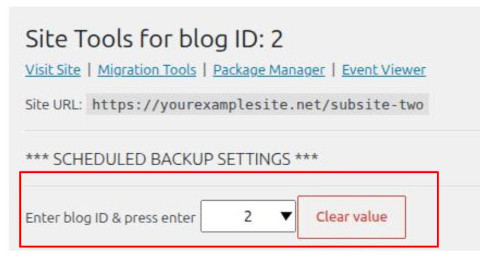
IMPORTANT: In multisite, each site has its own Toolbox settings. First, switch to the correct subsite by specifying the blog ID; see the screenshot below for how to enter this blog and load the correct Toolbox settings.
After saving the settings, “Mask admin credentials” should be checked and look like this:
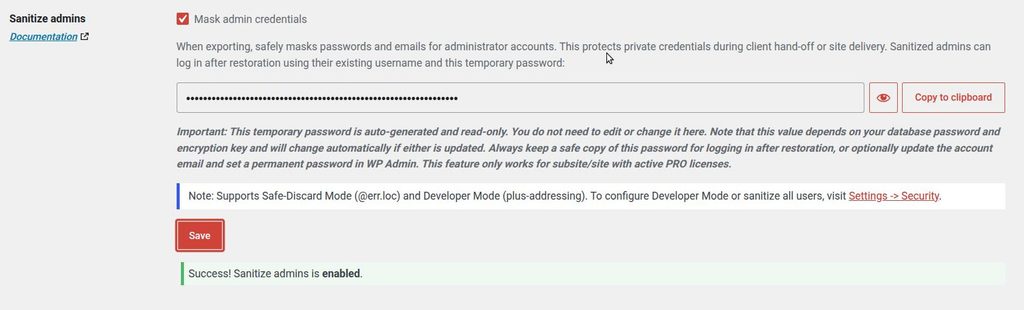
At this point, you tell Prime Mover to sanitize only the administrators in a single site or the super administrators in multisite. This is the default setting, and it also uses Safe-Discard Mode for email sanitization. This will sanitize an email such as test@test.com into something that looks like clr_am9obi5kb2@err.loc.
- [OPTIONAL] Now, suppose you want to sanitize all users in your production site (administrators + all users) when migrating to your staging site. To do this, go to Prime Mover PRO -> Settings -> Security Settings -> User Privacy. Make sure to check “Sanitize all users during export” and save it.
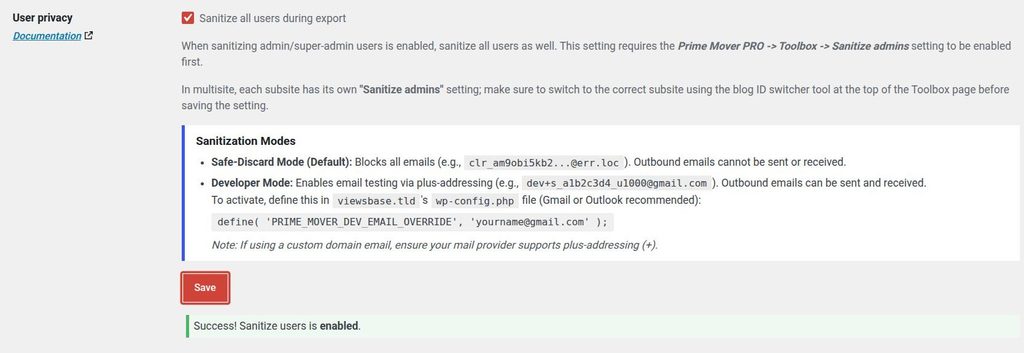
- [OPTIONAL] Now, suppose you want to test emails in your staging site but don’t want these emails to be sent to any of your client emails in your production site. In this case, use Developer Mode for email sanitization. To do this:
- Open your production site’s wp-config.php.
- Add this constant, and don’t forget to replace “replacewithyourown@gmail.com” with your Gmail address for developer email plus addressing, and save the changes:
define( 'PRIME_MOVER_DEV_EMAIL_OVERRIDE', 'replacewithyourown@gmail.com' );- Finally, you’re ready to export. Launch the export screen as you have been doing and create a complete site export for your single site (for example, a WordPress single-site environment). You can optionally create an encrypted export for better security.
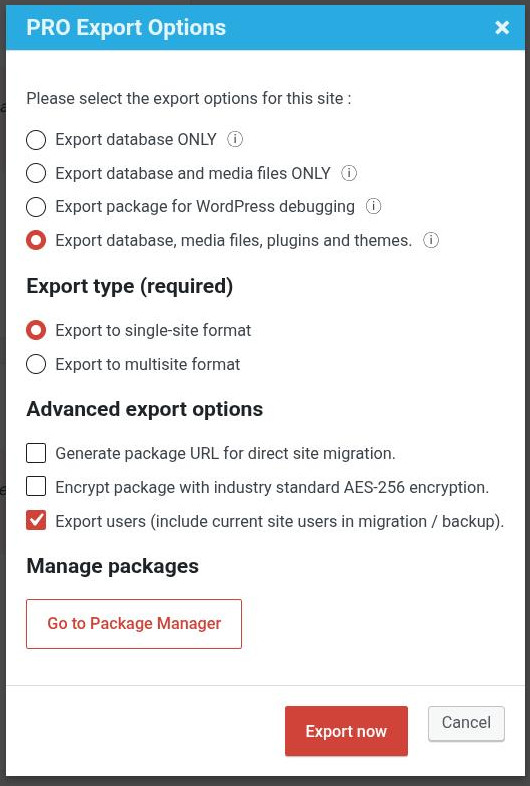
Since it’s a staging site, you need a complete clone of your site the first time it’s created, so you need to check “Export database, media files, plugins and themes“.
- Now it’s time to restore the sanitized package you created in your source site. You can restore this package just like any Prime Mover package. The good news is that you can use either the FREE or PRO version to restore a sanitized package as long as your target site is a single site or WordPress subsites (except the main site, which requires PRO). If you have created an encrypted package or want to use PRO features to restore, then you must also activate the license on your staging site. If during restoration you encounter the following warning:
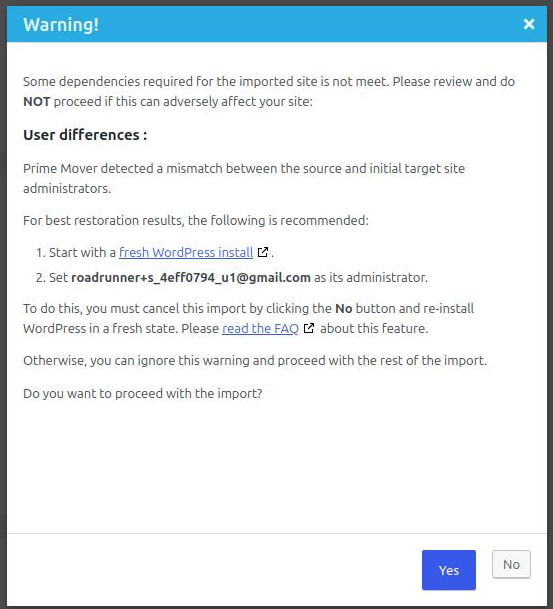
Note the suggested email, and set it on your staging site so your staging-site users match your production-site users.
IMPORTANT: For best results, you should always start with a fresh WordPress install (whether single-site or multisite) when creating a staging/dev site with sanitized users on it. Once Prime Mover PRO recommends the administrator email to use, follow these steps to create a fresh WordPress installation.
- After a successful restoration, check your WordPress users; you will notice they’re all sanitized. These are the expected results after restoration:
- User emails are sanitized according to your preferred format.
- User login (username) remains the same.
- The site front end and backend work exactly like the production site.
- Pick a sample user from your production site, then log in to that account on the development site using their source site username and the temporary password shown in your production site: Prime Mover PRO -> Toolbox -> *** Export-Import Utilities *** -> Sanitize admins, and then click the “Copy to clipboard” button.
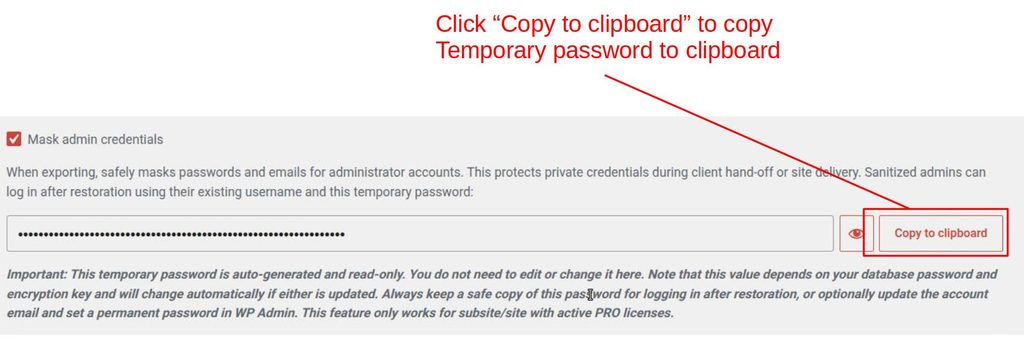
IMPORTANT: If you are providing the package to a third-party agency or developer, you need to share the temporary password with them so they can access the test users in their own dev sites.
- On the development site, you can do a lot, including testing new site features and plugin updates. When you are ready to deploy and push changes back to your production site, you can create an export. The export type depends on the changes you make. For example, if you change or update plugins, your export must include them (e.g., a full export that includes the database, media files, plugins, and themes). Or if you only change some text and no images, or just some plugin settings, exporting the database will do.
IMPORTANT: You don’t need to re-sanitize your user if you restore it to production; this is no longer needed. In fact, it is discouraged to prevent mixing up your users!
- Finally, when you restore it to production, it might warn that the site isn’t a fresh install and recommend a fresh install for best results; you can safely ignore this step and proceed with the restoration by clicking YES. The following are the expected results after restoring to production:
- No sanitized users are restored in production. Production users are real users with real emails. This is because your development and production users are already matched and mirrored (by user IDs following the steps outlined previously).
- The changes you made in the development site should restore correctly to production (e.g., plugin updates, etc.).
- The real user password remains the same on the production sites. Restoring from the development site should not overwrite your user password in production. The temporary password only applies to your development site.
In summary, the Prime Mover PRO user privacy feature lets you safely expand your site to any development or third-party web agency vendor without risking your real users’ customer emails, administrator emails, or passwords!
IMPORTANT: If you need to migrate your website from old hosting to new hosting or any new ‘production’ environment (such as a new domain). You need to migrate your ‘real’ users as well (and not sanitized); therefore, don’t forget to turn off the user sanitization feature in Prime Mover PRO -> Toolbox -> *** Export-Import Utilities *** -> Sanitize admins.
Frequenty Asked Question
- Can I safely remove
PRIME_MOVER_DEV_EMAIL_OVERRIDEconstant in my production site?
Answer: No. If you remove this constant in your production site and restore a package from development with sanitized users (using a developer email address like gmail.com), the restored users will not sync with your original site users and will be inserted as duplicates.
- Can I use
PRIME_MOVER_DEV_EMAIL_OVERRIDEconstant in my development site?
Answer: No. You should not re-sanitize any user on your development site. Once users are sanitized, leave them sanitized; you don’t need to export them again as sanitized to any site. This is best practice, so your production site can always align with, or sync back to, your sanitized users.
- Can I push my changes from the sanitized user development site to any site?
Answer: Ideally, no, because the user will always be sanitized, not a real user. Depending on your purpose, you can restore any sanitized package to any site, but it loses its purpose of re-syncing with its original users. That is why it works best to push changes back to the production site.
- Is my temporary password safe to share with 3rd-party vendors and agencies?
Answer: Yes, since you don’t want to share your users’ passwords in your production site database for privacy reasons. A temporary password is the only solution for them to log in to your development site. This temp password is a unique key string with only ONE purpose: to log in to your development site.
Of course, developers on dev sites can always change the temporary password on the development website if they prefer it for security reasons.
- Can I exclude some users from sanitization?
Yes, of course! Make sure you have the PRO version activated (with a license), and you must be logged in as an administrator (for a single site) or a super admin (for a multisite). Then go to any user in your site and edit their profile. You should see a section called “Prime Mover user privacy“; checking it excludes that user from sanitization. This is what it looks like:

- If I’m backing up (not migrating a test site), would it still be beneficial to sanitize users?
Yes and No! Yes, because sanitizing users means your backup won’t contain real users’ email addresses or passwords. The benefit is that if you restore this backup to any site (not your original site) or test server, such as your local or staging site, it will automatically restore sanitized users and protect your users’ privacy from the start. If you push these changes back to your original site, it will automatically sync with your site’s original users.
No – because if your production site happens to have all users deleted or the entire database deleted, restoring a sanitized backup package will only restore users with sanitized emails (not real user emails)! –
IMPORTANT: Based on the above, your official Prime Mover backup should always include your users’ original emails/passwords so you can restore easily to your original site in perfect state. Use only user sanitization when restoring to your development sites – this is always the best practice.
- Are sanitized @err.loc emails securely encrypted, or can they be decoded?
Sanitized emails using the @err.loc format (which utilize Base64-style encoding) are masked for privacy and operational safety, not cryptographically encrypted.
The Main Purpose: The primary goal of email sanitization in development and staging environments is to prevent accidental outbound emails (such as automated order notifications, password resets, or newsletter blasts) from reaching real live customers, clients, or subscribers.
Reversibility: Base64 is an encoding format, not an encryption algorithm. This means someone with database access can decode the original string back to plain text. It is designed to obfuscate data from casual view and stop automated mailing scripts, not to act as a cryptographic shield against malicious attackers.
Best Practice: Always treat staging and development environments as secure internal spaces. Protect staging sites with server-level password protection (such as HTTP Basic Auth), IP restrictions, or firewall rules, rather than relying solely on database email masking for full data security.
Last updated: October 20, 2026